Portfolio Management System
A personal Portfolio Management System I built to track my projects, document my journey as a developer/designer, and keep everything updated through a custom admin panel with analytics.
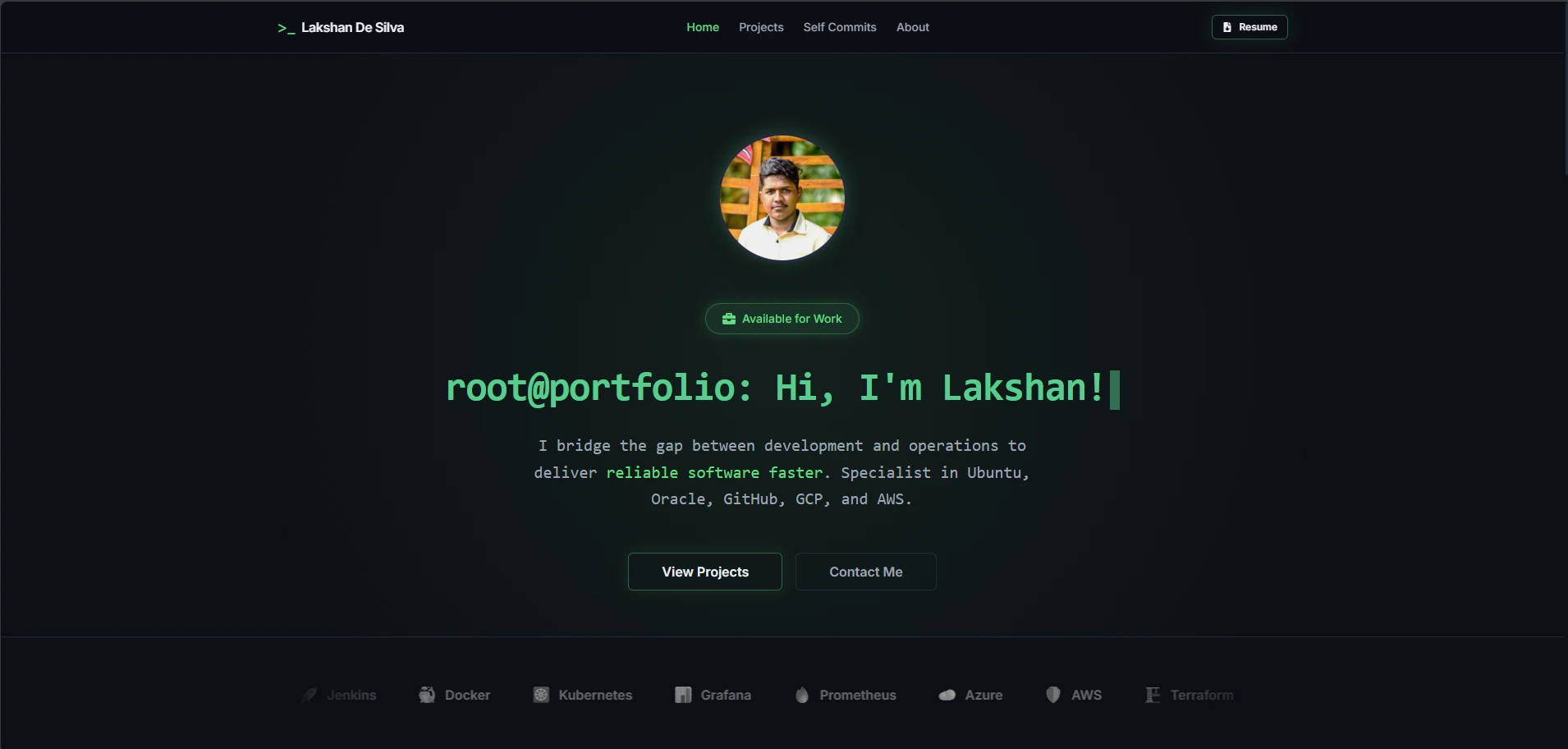
Portfolio Management System
# Overview
This is a personal Portfolio Management System I built to track my projects, document my journey as a developer/designer, and keep everything updated through a custom admin panel with analytics. My personal corner of the internet to show what I can do as a DevOps engineer, developer, and designer. It has a clean dark theme, an admin dashboard for managing content, and analytics to see who's checking out my work.
# Why I Built This
Let's be real here - I built this to get new leads and jobs. That's the honest truth. I wanted something that shows off my actual skills instead of just talking about them. I needed a place to prove I can actually build stuff. Not just talk about it. This project is my proof. It shows I can handle full-stack development, database management, authentication, deployment - the whole package. Also, I wanted to create opportunities for myself. When someone lands on my site, I want them to think "this person knows what they're doing." That's the goal.
# Technical Stack
Frontend Stuff
- Next.js 16 - The framework holding everything together
- TypeScript 5.9 - Type safety (even though I struggled with it at first)
- Tailwind CSS 4 - For all the styling and dark theme vibes
- React 19 - UI components
- Framer Motion - Smooth animations
- Recharts - For analytics charts in the admin panel
- React Icons - Nice icon library
Backend Stuff
- Prisma 7 - ORM for database stuff (this was new to me)
- SQLite with Better SQLite3 - Database (simple and portable)
- Next.js API Routes - Backend API
- TOTP (OTPAuth) - TOTP authentication with Google Authenticator
- bcryptjs - Password hashing
Other Tools
- npm - Package management
- ESLint - Code linting
- GitHub Actions - CI/CD stuff
# Problems I Ran Into
Okay, so this wasn't smooth sailing. I had zero experience with some of this stuff when I started.
TypeScript and Prisma was a total mystery to me. I knew JavaScript a little, but TypeScript with all its types and interfaces? Yeah, that was new. I spent way too much time fighting type errors. and Prisma, Never used an ORM before. Database migrations? Schema files? Seed scripts? All new concepts. I broke migrations more times than I can count.
I broke a lot of things:
- TypeScript was a mystery — fought type errors constantly
- Prisma was new — migrations broke, schema issues, seed scripts failing
- Dev server running perfectly — build failed.
- Migrations got corrupted — code all looks perfect.
- Logging sessions stopped working randomly — that actually didn't figure out yet, i just rewrite it again.
- Build processes failed — for no apparent reason.
- Type errors everywhere — #%$k me
- Database schema mismatches — that on me.
I had to learn, break things, fix them, and rebuild. Over and over again.
# How I Fixed Everything
Here's the secret - I used AI. A lot of AI.
I didn’t know much about TypeScript, Prisma, or most of the tools in this project—it was all new for me. To get it done in 12 days, I used AI a lot. I did write code myself, but I hit limits pretty quickly. There were functions and patterns I just didn't understand. but by reading through parts of the code, I could figure out what was going on about 50% of the time. Not bad for someone who nothing knew about this stuff a few weeks ago.
When something broke (and trust me, things broke constantly), I could look at the logs and use AI to help me fix it. Because I now understand how things work in this unknown space - at least a little bit.
The combination of:
- AI for complex problems
- Reading and understanding existing code
- Learning from logs and errors
That's how I got through it.
# What I'm Good At
Alright, let's talk about the stuff that came easy to me. Because not everything was a struggle.
Hosting and networking is my thing. I have prior knowledge here. I've hosted more than 100 projects to date. Each one with different tools, different styles, totally different projects. some are already borken, Some are open source prjects, some are my own stuff.Nginx setup was straightforward. I used it in CLI a long time ago, so it was just a matter of getting back into it. After a few commands, I got the hang of it.
This project is currently hosted alongside 2 other services on the same server. One is a CI/CD webhook setup, and the other is a completely different Python video generator project running on totally different ports. I had an nginx proxy server already set up, so I didn't have much to worry about there. Just added the new config for port 3000 and set everything up. SSL with certbot and auto-renewal - done.
GitHub CI/CD setup was manageable. My server is kind of a potato, so I decided to build inside GitHub Actions and send it back using SSH/SCP. The zip process issue was a quick fix. It doesn't include hidden files, so I struggled for a good amount of time to find the problem. But I figured it out eventually. Production and development package conflicts. Had to fix those during hosting. Not a big deal.
All in all, I finished this project in 12 days. I think I did a good job of showcasing my skills as a problem solver and a DevOps engineer during this phase.
# What I Learned
This project was basically a crash course in modern web development. Here's what I picked up:
- Basic npm stuff - Installing packages, running scripts, managing dependencies
- Basic Prisma - Database schema design, migrations, seeding data, CRUD operations
- TypeScript as a language - Types, interfaces, async/await, error handling
- GitHub Actions - CI/CD pipelines, automated deployments
- SSH - Connecting to servers, remote management (refined)
- Linux tools - Command line stuff, server administration (refined)
- Security - Session management, CSRF protection, rate limiting, two-factor authentication
- Session management - How to handle user sessions securely with expiration and renewal
It was a lot to take in, but I learned by doing. And breaking things. And fixing them again.
# Future Plans
I've got some cool ideas for where to take this next:
AI Chat Bot
I want to add a chat bot to the site. This is kind of a "why not" project, but I think it could be useful.
The idea is simple - someone can ask questions like "Who is Lakshan?" or "Why should I hire him?" and the bot will answer on my behalf. I promise, I'm not going to hardcode any answers. like dialog AI did, the bot will have access to my project knowledge and my thinking patterns. It'll generate responses based on that. Might sound stupid for a portfolio site now, but let's see how it goes.
Comments Section
I want to add a comment section for each project. If someone visits my site and has something to say, they can leave a comment - either anonymous or with their name. - Implemented!
Tool Pack Giveaway
This one's about being generous. If someone leaves me a comment, I'll give them a pack of tools that might help in their career. Not sure what yet, but I want to help people who help me.
These are all future plans. We'll see what actually happens.
# That's the Story
Yeah, that's my Portfolio Management System. Built in 12 days with a lot of AI, a lot of breaking things, and a lot of learning along the way.
It's not perfect, but it works. It proves I can build real stuff and showcases my skills as a developer and DevOps engineer.
- Lakshan | portfolio v1.1
Leave a suggestion to improve!
Share your thoughts about this project